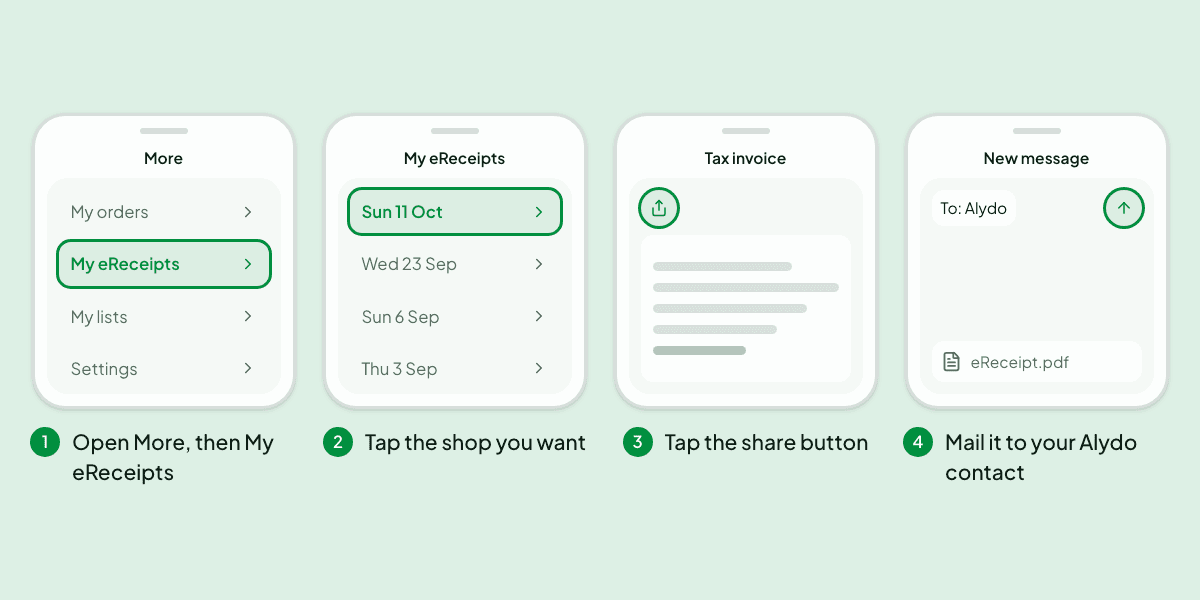
If you use the Woolworths app, the receipt for your last in-store shop may already be on your phone. You can send it to Alydo in four taps, without finding the paper one or taking a photo of it.
Alydo gives every account its own receipts email address. Anything you mail to it is read the same way a scanned receipt is: store, date, every item and what it cost. The Woolworths app can mail a receipt as a PDF, so the two fit together.
Before You Start: Save Your Address as a Contact
Your address is under Settings, then Receipt forwarding. It is long on purpose, because it works like a password for your receipts. Nobody wants to paste it every time.
Tap Add to contacts under the address and save the contact your phone shows you. It is called Alydo receipts. From then on you type the first few letters of that name and your mail app fills in the rest.
The Four Taps
More
My ordersMy eReceiptsMy listsSettings1Open More, then My eReceipts
My eReceipts
Sun 11 OctWed 23 SepSun 6 SepThu 3 Sep2Tap the shop you want
Tax invoice
3Tap the share button
New message
To: AlydoeReceipt.pdf4Mail it to your Alydo contact
- In the Woolworths app, open More, then My eReceipts.
- Tap the shop you want. The receipt opens as a tax invoice.
- Tap the share button at the top and choose your mail app. The receipt is attached as a PDF.
- Address it to your Alydo receipts contact and send. You do not need to write anything in the message.
We followed these steps on an iPhone with the Woolworths app on 11 October 2026. Apps move their menus around, so yours may look a little different. If you cannot find My eReceipts at all, Woolworths describes how its eReceipts work on its own page.
Source: Woolworths, Everyday Rewards app.
What Happens Next
Give it a minute, then open your history. The shop is there with its items, just as if you had scanned it. If you have the emails about forwarded receipts turned on, you get one saying it was added.
If it does not turn up, go back to Receipt forwarding in Settings and open Recent forwarded emails. Every message you sent is listed there with how it ended, so you can see whether it was added, skipped or could not be read.
Three Things Worth Knowing
- One receipt per email. If you attach several, only the first is read.
- Up to 10 a day. That is plenty for keeping up, and it means catching up on a few months of shops takes a few days.
- Keep the address to yourself. Anyone who has it can add receipts to your account. If it gets out, Receipt forwarding in Settings has a button that replaces it with a new one.
Why Not Just Take a Photo?
A photo works, and the scan screen is still the quickest way when the paper receipt is in your hand. But a paper receipt fades, creases and gets left in the bag. The eReceipt is the store's own copy, with every line spelled out exactly as the register recorded it, so there is nothing for a camera to misread.
Does This Work for Other Stores?
We have only checked it with Woolworths so far, so that is the only one we will promise. The idea is not specific to Woolworths, though. If another store's app or email gives you a receipt as a PDF, mail it to the same address and put the word receipt in the subject line. If it works, or if it does not, tell us which store and we will take a look.
Online orders are a different route. Those arrive as emails already, and you can have your inbox pass them on by itself. The setup for that is in the same place, under Receipt forwarding.